What Is User Segmentation?
User segmentation is the practice of dividing your users or customers into distinct groups based on shared characteristics — such as demographics, behavior, location, or company type — so you can deliver more relevant marketing, product experiences, and communications to each group. It works by collecting data about your users, identifying meaningful patterns, and building segments that your marketing and product teams can act on.
User segment groups are groups of users who share similar characteristics like industry, company size, location, gender, age, preferences, and behavior. Since these characteristics can vary widely, it is normally hard to define what type of marketing should be addressed to whom. User segmentation solves this by letting each segment be treated with a tailored strategy rather than a one-size-fits-all approach — which is especially powerful for SaaS businesses where user needs diverge sharply between customer types.
In the SaaS industry, smaller targeted segments and their focused campaigns consistently outperform broad, non-targeted marketing. Segmentation allows your marketing department to craft niche-focused messages and implement specifically tailored strategies for each user group, defined by a set of relevant parameters that matter most to your product’s growth.
Why User Segmentation Matters for Marketing
User segmentation is not simply a tactical marketing tool — it is a strategic foundation that affects retention, conversion, and revenue. When you know exactly who your users are and what they need, every touchpoint becomes more effective. Research consistently shows that personalized, segment-specific communications generate significantly higher open rates, click-through rates, and conversion rates compared to generic campaigns.
For SaaS businesses specifically, segmentation delivers three core benefits. First, it reduces churn: by identifying at-risk user segments early — for example, users who signed up but never completed onboarding — your team can trigger targeted interventions before users disengage. Second, it improves product-market fit: when you understand which user segments get the most value from your product, you can double down on acquiring more users like them and build features that deepen that value. Third, it enables more cost-effective marketing: rather than spending budget on broad campaigns, you allocate it precisely where it will convert.
Beyond these, segmentation powers better feature announcements, onboarding flows, upsell campaigns, and customer success outreach — all of which compound over time into higher lifetime value and lower acquisition costs. The businesses that treat segmentation as a core discipline, not an afterthought, are consistently the ones that scale efficiently.

6 Types of User Segmentation
Not all segmentation is created equal. Different types of segmentation capture different dimensions of your users, and the most effective marketing strategies combine multiple types to build rich, actionable segments. Here are the six most important types for SaaS and B2B marketers.
1. Demographic Segmentation
Demographic segmentation divides users based on measurable personal characteristics such as age, gender, job title, and income level. For B2C SaaS products, demographic data helps tailor messaging to different life stages or income brackets. For B2B products, demographics at the individual level (such as job seniority or role) determine who within an organization is most likely to be a champion for your product.
Example: A SaaS project management tool might segment users by job title — showing “team leads” content about managing workload distribution, while showing “individual contributors” content about personal productivity. The same product, but entirely different value propositions delivered to each segment.
When to use it: When your product serves users with meaningfully different roles, seniority levels, or personal characteristics that drive different behaviors or purchasing decisions.
2. Behavioral Segmentation
Behavioral segmentation is arguably the most powerful type for SaaS businesses because it groups users by what they actually do — not what they say or who they are. Behavioral data includes product usage patterns, feature adoption, login frequency, pages visited, actions taken, and purchase history. It captures intent signals in real time.
Example: You might segment users into “power users” (daily active, using 5+ features), “casual users” (weekly active, using 1–2 features), and “at-risk users” (no login in 14+ days). Each segment receives a completely different communication: power users get invited to beta features and referral programs; casual users receive tips to discover more value; at-risk users get a re-engagement email with a personalized use case.
When to use it: For onboarding optimization, churn prevention, feature adoption campaigns, and upsell triggers. Behavioral segmentation should be running continuously, not just at campaign time.
3. Psychographic Segmentation
Psychographic segmentation groups users by psychological attributes — their values, attitudes, interests, lifestyle, and motivations. Unlike demographic data, which describes who someone is, psychographic data reveals why they behave the way they do. This type of segmentation is particularly useful for crafting messaging that resonates emotionally rather than just informationally.
Example: Among SaaS buyers, some are driven by efficiency (they want to save time above all else), while others are driven by status or innovation (they want to be seen as early adopters of cutting-edge tools). Messaging that emphasizes “save 10 hours a week” will resonate with the former; messaging that emphasizes “join 500 forward-thinking companies” will resonate with the latter. Psychographic segmentation lets you serve both with the same product but different stories.
When to use it: For content marketing, brand positioning, paid advertising creative, and email nurture sequences where emotional resonance matters as much as feature lists.
4. Geographic Segmentation
Geographic segmentation divides users by location — country, region, city, or even timezone. For global SaaS products, geography shapes everything from language and cultural references to pricing sensitivity, compliance requirements, and the competitive landscape users are familiar with. Geographic segments also matter for scheduling communications — an email sent at 9am sender time might arrive at 3am for a user in a different timezone.
Example: A SaaS company might send a GDPR-focused onboarding email specifically to European users, while sending a SOC 2 compliance-focused version to US enterprise users. Both speak to data security, but the specific framing matches each region’s regulatory context and buyer concern.
When to use it: For localization, regional pricing campaigns, compliance-focused messaging, event promotion (webinars, conferences), and market expansion efforts.
5. Firmographic Segmentation
Firmographic segmentation applies to B2B SaaS and groups users by characteristics of the companies they work for — industry vertical, company size (headcount or revenue), funding stage, tech stack, or geography at the company level. Firmographic data is often the most decisive filter for B2B purchase decisions because the same product can serve radically different use cases depending on company type.
Example: A startup with 10 employees has completely different onboarding needs, pricing sensitivity, and success metrics than an enterprise with 10,000 employees. Treating them the same way in your marketing funnel is a losing strategy. By segmenting firmographically, you can show startups flexible, low-friction plans with quick setup content, while showing enterprises security documentation, SSO setup guides, and enterprise case studies.
When to use it: For account-based marketing (ABM), enterprise sales enablement, industry-specific landing pages, and pricing page optimization.
6. Technographic Segmentation
Technographic segmentation is a newer but increasingly important type, especially for SaaS tools that integrate with other software. It groups users by the technologies they already use — their existing CRM, analytics platform, communication tools, or development stack. This data helps you understand buyer readiness, identify integration opportunities, and personalize messaging based on tools your users already trust.
Example: If you know a prospect already uses HubSpot as their CRM, you can lead your outreach with your HubSpot integration, reducing the friction of adoption. If they use Salesforce, you highlight a different integration. Technographic data also signals company maturity — teams using Segment, Amplitude, and Intercom are more likely to have data-driven cultures and will respond to analytics-forward messaging.
When to use it: For product-led growth campaigns, integration marketing, competitive displacement campaigns, and personalized onboarding based on existing tech stack.
How to Build a User Segmentation Strategy: 5 Steps
Knowing the types of segmentation is one thing — putting them into practice requires a clear, repeatable process. Here is a five-step framework that works for SaaS marketing teams of any size.
Step 1: Define your goals. Before you segment anyone, get specific about what you are trying to achieve. Are you trying to reduce churn? Increase feature adoption? Improve trial-to-paid conversion? Each goal points to a different type of segmentation and different data sources. Churn prevention points to behavioral data; feature adoption points to usage data; conversion improvement points to firmographic and behavioral combined. Start with one goal, build that segment well, then expand.
Step 2: Choose your data sources. User segmentation is only as good as the data behind it. Map out what data you are already collecting: product analytics (Mixpanel, Amplitude), CRM data (HubSpot, Salesforce), email engagement data, support ticket history, and in-app survey responses. Then identify the gaps. If you want to do firmographic segmentation but don’t have company size data, you will need to enrich your records using a tool like Clearbit or Apollo. Do not build segments on data you don’t have — start with what you know and expand over time.
Step 3: Build your segments. Once you have a goal and data, define the rules for each segment. Be specific: not “engaged users” but “users who have logged in at least 3 times in the last 7 days AND used the reporting feature at least once.” Vague segments produce vague results. Use your analytics platform or CRM to build dynamic segments that update automatically as user behavior changes — so a user who re-engages automatically moves from your “at-risk” segment to your “returning user” segment without manual work.
Step 4: Test your messaging. For each segment, define the specific message, channel, and timing. Then test. Run A/B tests on email subject lines, in-app notification copy, and ad creative for each segment independently — do not test across segments at once, as that conflates too many variables. Give each test enough time (typically 2–4 weeks for email, 1–2 weeks for in-app) to reach statistical significance before declaring a winner.
Step 5: Measure results and iterate. Track segment-level metrics, not just campaign-level metrics. Did the “at-risk” segment’s churn rate decrease after the re-engagement campaign? Did power users who received early feature access show higher NPS scores? Segment-level measurement reveals whether your strategy is working for the right users. Review segment performance monthly, update segment definitions quarterly as your user base evolves, and retire segments that no longer serve a clear purpose.
User Segmentation in SaaS: 5 Real-World Use Cases
Theory is useful, but seeing exactly how SaaS companies apply segmentation to real problems makes the strategy tangible. Here are five concrete scenarios where segmentation drives measurable results.
Segmenting new users for onboarding. Not all new users start from the same point. A developer signing up for an API-first tool has entirely different onboarding needs than a marketing manager signing up for the same tool’s no-code interface. By segmenting new users at signup — using a brief onboarding questionnaire or CRM enrichment — you can route each user into a tailored onboarding sequence that shows them the exact features relevant to their role, reducing time-to-value and increasing activation rates.
Segmenting disengaged users to reduce churn. Behavioral segmentation excels here. By identifying users who haven’t logged in for 14 days, or who are using significantly fewer features than they did in their first week, you can trigger a targeted win-back campaign before they make the decision to cancel. Companies like Duolingo have famously used behavioral re-engagement segmentation to drive massive improvements in retention — the principle applies equally well to B2B SaaS.
Segmenting power users for referral and advocacy programs. Your power users — the ones who use your product daily, adopt new features early, and have high NPS scores — are your best source of organic growth. By segmenting and identifying this group, you can invite them to referral programs, case study participation, beta testing groups, and community leadership roles. These users are far more likely to respond positively than the average user, and the ROI on advocacy programs is substantially higher when targeted at the right segment.
Segmenting by company size for pricing page optimization. Enterprise visitors to your pricing page have different questions than startup visitors. By using firmographic data (from IP-based company detection or CRM enrichment), you can dynamically show enterprise visitors social proof from Fortune 500 companies, security certifications, and “talk to sales” CTAs — while showing startup visitors self-serve signup options, transparent pricing, and quick-start guides. This single segmentation application has been shown to meaningfully improve conversion rates on high-intent pages.
Segmenting users for feature announcements. This is one of the highest-leverage applications of segmentation in SaaS, and it’s where tools like AnnounceKit shine. Rather than sending every product update to every user — which leads to notification fatigue and high unsubscribe rates — you can target each feature announcement to exactly the users who will benefit from it. New integrations go to users who have connected your API. New reporting features go to users who have used existing reports. New mobile features go to users who have logged in on mobile. When users receive announcements that are actually relevant to them, engagement rates increase dramatically and the announcement itself becomes a value-add rather than noise.
How to Use User Segmentation for Feature Announcements with AnnounceKit
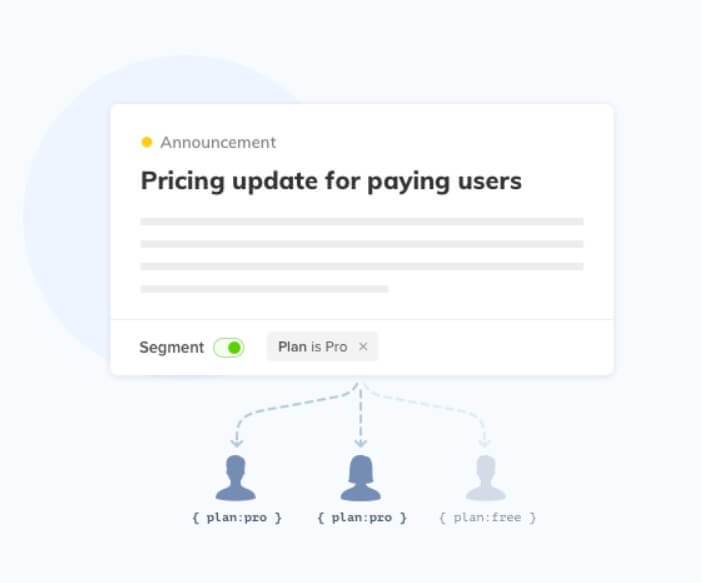
AnnounceKit is built specifically around the principle that the right announcement delivered to the right user at the right time is exponentially more effective than broadcasting every update to everyone. The platform lets you target your changelog widget and in-app notifications to specific user segments based on plan, role, location, past events, custom attributes, or any other data you pass through the JavaScript snippet.
In practice, this means a SaaS product team can configure AnnounceKit to show a “New Enterprise SSO Feature” announcement only to users on Enterprise plans, while showing a “New Zapier Integration” announcement only to users who have previously accessed the integrations page. This kind of precision targeting does three things simultaneously: it makes each announcement feel personally relevant, it reduces notification fatigue for users who would not benefit from an update, and it increases the click-through and adoption rate for each feature being announced.
Setting up segmentation in AnnounceKit is straightforward. You pass user properties (plan, role, company size, feature usage flags, or any custom attributes) via the JavaScript initialization, and then when creating an announcement in the AnnounceKit dashboard, you define the segment rules that determine who sees it. The result is a changelog that feels curated to each user, which consistently produces higher engagement and a stronger signal that your product is improving in ways that matter to them specifically.
What Good User Segmentation Looks Like
Effective segmentation shares four defining characteristics, regardless of industry or segment type.
First, it is measurable. Good segments are defined by concrete, quantifiable parameters — not vague labels. “Enterprise users on the Growth plan who have used the API at least once in the last 30 days” is measurable. “Tech-savvy power users” is not. Measurability ensures you can track segment performance over time and make data-driven decisions about whether your strategy is working.
Second, it is addressable. You must have a channel and a message to reach each segment you define. If you identify a valuable segment but have no way to communicate with them specifically — no email, no in-app channel, no ad targeting — then the segment is an academic exercise. Address this by ensuring your segmentation strategy is built alongside your channel strategy.
Third, it is consistent. Segment definitions should remain stable enough to allow meaningful comparison over time. If you change your “at-risk” segment definition every month, you can never know whether your churn intervention is working. Establish core segments with stable definitions, then add experimental segments separately when testing new hypotheses.
Fourth, it is flexible. Users move between segments as their behavior and circumstances change. A new user becomes an active user becomes a power user — or alternatively, a power user becomes an at-risk user during a period of disengagement. Segmentation systems should update dynamically to reflect current user state, not freeze users in the segment they joined when they first signed up.
Churn Rates and User Segmentation
Churn rate is one of the most powerful parameters for defining user segmentation characteristics, and it deserves dedicated attention. By analyzing which user segments churn at higher rates, marketing and customer success teams can identify both the warning signs of churn and the intervention strategies that are most effective for each segment.
Marketing departments are generally well-positioned to use churn data because they combine customer understanding, product knowledge, and expertise in communication channels. By integrating churn signals into segmentation — for example, building a segment of users whose login frequency has dropped by more than 50% month-over-month — teams can proactively reach out before the user makes a cancellation decision. Statistics and trends in user behavior lead to accurate churn predictions, and one of the simplest yet most effective segmentation parameters is user age: long-term users and short-term users have meaningfully different needs, engagement patterns, and churn drivers. Some users need more time to find value in your product, and segmenting by tenure lets you tailor the support and messaging they receive during that critical window.
FAQ: User Segmentation for Marketing
What is the difference between user segmentation and customer segmentation?
User segmentation and customer segmentation are closely related but not identical. Customer segmentation typically refers to dividing paying customers by characteristics relevant to retention and revenue — such as plan tier, lifetime value, or purchase frequency. User segmentation is broader and applies to all users of a product, including free users, trial users, and prospects who have not yet converted. In SaaS, it is especially important to segment across the full user lifecycle, not just among paying customers, because many growth opportunities (activation, conversion, expansion) happen before and around the payment event.
What data do I need to start user segmentation?
You can start with basic data you almost certainly already have: signup date, plan type, last login date, and any properties you collected at onboarding (company name, role, use case). This data alone allows you to build meaningful segments around tenure, plan tier, and inferred role. As you mature your segmentation practice, you can enrich with behavioral data from your analytics platform, firmographic enrichment from tools like Clearbit, and psychographic signals from in-app surveys. Start simple — one or two segments with clear actions — and expand from there.
How many segments should I start with?
Start with three to five segments that map directly to specific actions you can take. More segments than you can act on is a distraction. A practical starting set might be: (1) new users in their first 7 days, (2) active users who have reached activation milestones, (3) at-risk users who have not logged in for 14+ days, (4) power users with high engagement, and (5) churned users for win-back campaigns. Each of these segments has an obvious communication strategy and measurable success metric.
What is the difference between behavioral and psychographic segmentation?
Behavioral segmentation is based on what users actually do — actions, events, usage patterns, purchase history. Psychographic segmentation is based on why they do it — their values, motivations, attitudes, and lifestyle. Behavioral data is typically collected automatically from your product analytics, while psychographic data usually requires surveys, interviews, or inferred signals from content consumption patterns. For SaaS, behavioral segmentation is usually more immediately actionable, while psychographic segmentation is most valuable for brand messaging, content strategy, and positioning work.
How often should I update my user segments?
Dynamic segments (defined by behavioral rules like “last login within 30 days”) should update automatically and continuously. Static segments (defined by a snapshot, like “users who signed up during a specific campaign”) do not change. Your segment definitions themselves should be reviewed quarterly — not monthly, as that introduces too much churn in your strategy, but at least four times a year to ensure your segments still reflect meaningful distinctions in your user base. Major product changes, pricing changes, or ICP shifts are triggers to revisit your segmentation definitions proactively.
Can small SaaS teams use user segmentation effectively?
Absolutely — in fact, smaller teams often benefit more from segmentation because their resources are constrained and targeting the right users with the right message is even more critical. You do not need an enterprise data warehouse to start. Most modern SaaS tools (Intercom, Customer.io, HubSpot, AnnounceKit) have built-in segmentation capabilities that work off the data you are already collecting. The key is to start with simple, high-impact segments and build the habit of segment-driven communication before adding complexity.
How does user segmentation relate to product-led growth?
User segmentation is foundational to product-led growth (PLG). In a PLG motion, the product itself is the primary driver of acquisition, activation, and expansion — which means every in-product communication, onboarding flow, and upgrade prompt must be precisely targeted to be effective. Segmenting users by their current activation stage, feature usage, and expansion signals allows PLG teams to trigger the right nudge at the right moment: showing an upgrade prompt to a user who has hit a usage limit, or surfacing a collaboration feature to a user who has just invited a teammate. Without segmentation, PLG devolves into generic in-app popups that users quickly learn to ignore.
Conclusion
SaaS user segmentation is one of the highest-leverage tools available to your marketing department. It enables you to move from generic, broadcast communication to precise, personalized outreach that respects your users’ time and delivers genuinely relevant value. The businesses that treat segmentation as a core discipline — maintaining clean data, building well-defined segments, testing messaging systematically, and measuring results at the segment level — consistently outperform those that do not on every metric that matters: conversion, retention, and lifetime value.
Micro-segmentation and AI-assisted behavioral analysis will continue to accelerate the depth and precision of what is possible, but the fundamentals remain unchanged: understand your users, define meaningful groups, and communicate differently with each. Start with three segments, act on them consistently, measure the results, and expand from there. Segmentation done well is not a project you complete — it is a practice you build into how your team operates.
As a SaaS product itself, AnnounceKit deploys user segmentation as a means for making relevant and on-point product announcements at the right time. Learn how to announce new features to the right users — and explore our other features to make the most out of segmentation in your product updates workflow.
Recommended article: User Adoption Strategies | How to Announce New Features to Drive More Product Adoption