
All Features
The product communication platform
One platform replaces your changelog tool, feedback tool, NPS tool, and in-app messaging. Announce, collect, measure, and automate - connected.
AnnounceKit is a product communication platform for SaaS teams. It combines changelog management, in-app notification widgets, feature request tracking with voting, NPS surveys, and multi-channel email delivery into a single dashboard. Teams write a product update once and AnnounceKit delivers it across their changelog page, in-app widgets, email, Slack, and RSS - automatically.
All features at a glance
| Category | Feature | Description |
|---|---|---|
| Announce | In-app widgets | Badge, popup, sidebar, embed, floating button, drawer, top bar, modal, overlay, and boosters - 10+ display modes |
| Announce | Changelog page | Standalone updates page on your domain with custom CSS, multi-language, and SEO support |
| Announce | Multi-channel delivery | One post, every channel - in-app widget, email digest, Slack, RSS, and webhooks from a single announcement |
| Collect | Feature requests & voting | Users submit ideas and vote. Your team reviews, approves, merges duplicates - best ideas rise to the top |
| Collect | Roadmap | Customizable statuses - In Review, In Planning, In Progress. Jira integration keeps engineering in sync |
| Measure | Analytics dashboard | Widget loads, opens, feed views, and post-level engagement |
| Measure | Reactions & comments | Users respond with emoji reactions and comments - see sentiment at a glance |
| Measure | NPS surveys | In-app NPS surveys with follow-up questions alongside your updates |
| Measure | User tracking | Identify users by email, company, or custom properties - see who read what |
| Measure | Segmentation & targeting | Segment by role, location, plan, or custom property - show the right update to the right user |
| Automate | AI post generator | Describe what you shipped - AI generates two polished alternatives, one creative, one concise |
| Automate | Post templates | Save and reuse templates for consistent formatting across your team |
| Automate | Email digest automation | Automatic weekly, monthly, quarterly, or yearly digests sent to subscribers |
| Automate | Webhook events | 11 webhook event types for Zapier, Make, n8n, or your own integrations |
| Automate | Scheduled posts | Write now, publish later - set publish dates, expiry dates, and pause states |
| More | Custom Domain + SSL | Host your changelog on your own domain with SSL |
| More | Private Feed | Make your feed private or public |
| More | User Tracking & Sync | Identify users by email, company, or custom properties |
| More | Custom Labels | Add labels to requests and posts |
| More | Team Management (RBAC) | Role-based access control for your team |
| More | Post Pinning | Pin important posts to the top |
| More | Post Expiry & Pause | Set expiry dates and pause states for posts |
| More | Custom CSS & JavaScript | Style your changelog with custom CSS and JavaScript |
| More | RSS/Atom/JSON Feed | RSS, Atom and JSON Feed for your updates |
| More | JIRA Integration | Sync roadmap items with Jira tickets |
| More | Two-Factor Authentication | 2FA for account security |
| More | SAML SSO | Single sign-on for enterprise |
| More | IP Access Control | Restrict access by IP address |
| More | Audit Log | Track all changes and actions |
| More | White-label (Enterprise) | Remove AnnounceKit branding for enterprise |
Pillar 1
Announce - Push updates users actually see
Don't publish updates into the void. Push them into your product, email inboxes, and Slack channels.
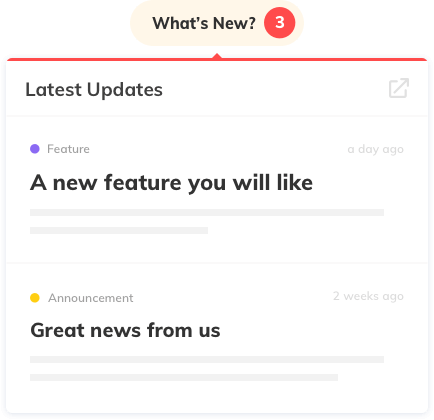
In-app widgets - 10+ display modes
Badge, popup, sidebar, embed, floating button, drawer, top bar, modal, overlay, and boosters. Pick the format that fits your product. Target specific users with segmentation.
See all widget types →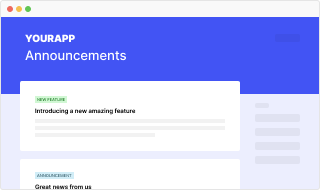
Changelog & standalone feed
Your own updates page - on your domain, styled to your brand with custom CSS. Multi-language, SEO-friendly, and private or public.
- Custom domain + SSL
- Custom CSS & JavaScript
- RSS, Atom & JSON Feed
- Multi-language support

Multi-channel delivery
One post, every channel. In-app widget, email digest, Slack notifications, RSS feed, and webhooks - all from a single announcement.
- Automated email digest (weekly, monthly, quarterly)
- Slack channel notifications
- Boosters to amplify changelog posts (pop-up, bar, modal)
- Post scheduling, expiration & pause
Pillar 2
Collect - Let users tell you what to build
Feature requests, voting, and feedback built into the same platform where you announce. Close the loop.
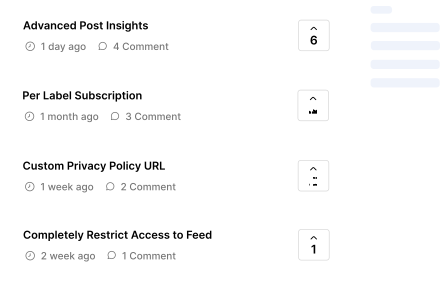
Feature requests & voting
Users submit ideas and vote on what they want. Your team reviews, approves, and merges duplicates. The best ideas rise to the top.
- Public or private request board
- User voting with manual adjustments
- Comments, replies & labels
- Approval workflow
- Merge duplicate requests
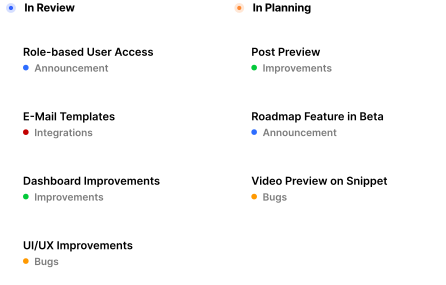
Roadmap
Show users what's coming. Customizable statuses - In Review, In Planning, In Progress. When a feature ships, announce it. Jira integration keeps engineering in sync.
- Customizable roadmap stages
- Jira integration for ticket syncing
- Connected to announcements
Pillar 3
Measure - See what lands and what doesn't
Know which updates get read, who's engaged, and what your users think - without leaving the platform.
Analytics dashboard
Widget loads, opens, feed views, and post-level engagement. See what your users care about.
Reactions & comments
Users respond with emoji reactions and comments. See sentiment at a glance.
NPS surveys
In-app NPS surveys with follow-up questions. Measure satisfaction alongside your updates.
User tracking
Identify users by email, company, or custom properties. See who read what.
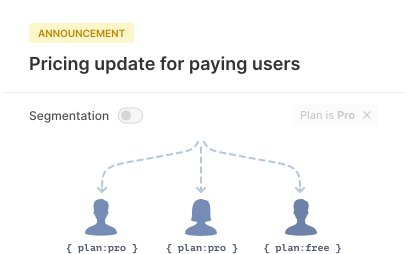
Segmentation & targeting
Segment users by role, location, plan, or any custom property. Show the right update to the right user. Filter feature requests and analytics by segment.
Segmentation feature page →Pillar 4
Automate - Spend minutes, not hours
AI writes the first draft. You edit and ship. Automations handle the rest.
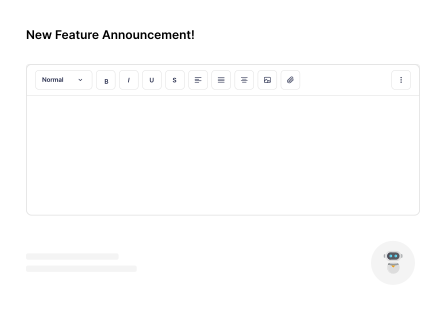
AI post generator & MCP server
Describe what you shipped. AI generates two polished alternatives - one creative, one concise. And with the official AnnounceKit MCP server, Claude, ChatGPT, Cursor, and your own agents can draft, update, and publish posts directly.
- AI post generator - available on all plans
- Official MCP server (changelog automation)
- Inline AI editor (fix grammar, adjust tone, translate)
- Auto-translate to any language
Post templates
Save and reuse templates for consistent formatting across your team.
Email digest automation
Automatic weekly, monthly, quarterly, or yearly digests sent to subscribers.
Webhook events
11 webhook event types for Zapier, Make, n8n, or your own integrations.
Scheduled posts
Write now, publish later. Set publish dates, expiry dates, and pause states.
And there's more
Frequently asked questions
What features does AnnounceKit include?
AnnounceKit includes in-app notification widgets (10+ display modes), a changelog page on your own domain, feature request tracking with voting, NPS surveys, AI post generation, audience segmentation, analytics, email digest automation, Slack integration, and webhook events.
Does AnnounceKit have an AI writing assistant?
Yes. AnnounceKit includes an AI post generator, available on all plans. It generates two polished alternatives from your description - one creative, one concise. You can also use inline AI actions to fix grammar, adjust tone, or translate text.
Does AnnounceKit have an MCP server?
Yes. AnnounceKit ships an official Model Context Protocol (MCP) server at https://mcp.announcekit.app/mcp. Connect Claude, ChatGPT, Cursor, or any MCP client and your AI can draft, update, publish, and schedule posts, read feedback and feature requests, manage the roadmap, and read stats. It is read and create/update/publish only, with no delete or billing actions. See changelog automation.
Can I segment which users see my product updates?
Yes. AnnounceKit supports audience segmentation by role, location, plan, or any custom property. You can target specific user segments with different updates and filter feature requests and analytics by segment.
Does AnnounceKit support email notifications?
Yes. AnnounceKit sends automated email digests to subscribers - weekly, monthly, quarterly, or yearly. You can also send Slack channel notifications, RSS feeds, and trigger webhooks for custom workflows.
Is there a free trial?
Yes. AnnounceKit offers a 15-day free trial with all features included. No credit card is required to start.
Does AnnounceKit have a GraphQL or REST API?
Yes. AnnounceKit provides a GraphQL API and REST endpoints for posts, users, and widgets. You can create and update posts programmatically, sync user data, and receive 11 webhook event types for custom integrations.
Can I integrate AnnounceKit with Slack?
Yes. AnnounceKit can post to Slack channels when you publish an update. You can choose which channels get notified and customize the message. The integration is available on all plans.
Does AnnounceKit support feature requests and voting?
Yes. AnnounceKit includes a feature request board with voting, comments, and roadmap stages. You can merge duplicates, connect to Jira, and announce when a requested feature ships - all in the same platform.
How does NPS work in AnnounceKit?
AnnounceKit lets you run in-app NPS surveys with follow-up questions. You can segment who sees the survey (e.g. by plan or tenure), schedule campaigns, and view results alongside your product updates in one dashboard.
Is AnnounceKit suitable for enterprise?
Yes. SAML SSO, role-based access, SOC 2 report access and white-label are available as self-serve add-ons. Enterprise adds audit logs, IP-restricted private changelogs, SLAs, custom contracts and a dedicated account manager.