
Release notes are short, structured summaries that describe what changed in a new version of a product. They tell users what is new, what was fixed, and what was improved. Slack has turned release notes into an art form — combining transparency, personality, and brevity in a way that most SaaS teams only dream of. In this guide, you’ll see exactly how Slack does it, plus best practices, real examples from other leading SaaS companies, and copy-paste templates you can use today.
Most app release notes are boring. Nobody wants to read them — they write the same thing in different releases: “Bug fixes and performance improvements.” Slack makes release notes fun. So is this difference actually important?
Nowadays, it is very difficult for people to focus on one subject for a long time. Various external factors cause us to be distracted. We are surrounded by stimulants. A notification from social media, a message from a friend, or some of your habits can reduce your focus time.
In every aspect of our lives, we come across written, shot, designed, or developed content and products whose primary goal is to attract our attention. It can be a book cover, it can be a series with short episodes, or it can be a social media platform where you can share in 3 short steps.
It is not difficult to predict the fate of ordinary and boring things: they will not be consumed and used.
A similar situation applies to SaaS companies. They’re split on the release notes. Some share release notes that are pretty fun and easy to read, just like the Slack release notes. Others post boring software release notes that consist of a single sentence or long paragraphs.
If Slack release notes were boring, it wouldn’t be the subject of this article, would it? Let’s look at examples of Slack release notes and try to find the details that set them apart — and then show you how to replicate that quality for your own product.
What Are Release Notes?
Release notes are a short overview of the changes that have been made in a new version of an app or software product. They help users who have already installed your app to stay informed about changes and updates, while also helping new users understand the product’s evolution. Release notes are the direct line of communication between your engineering and product teams and the people who use what you build.
Slack also writes release notes for this purpose — but Slack’s release notes look radically different from regular ones. They use poetry, humor, callbacks, and an unmistakably human voice. How do they achieve this? We’ll see below.
Why Do Mobile Apps Write and Share Release Notes?
Mobile apps often have different lifetimes. Users download an app, use it for a few days or weeks, then switch to another app or delete it entirely. If you want to build a long-term relationship with your users, you need to continually improve your apps and add new features so your users can continue to use them.
Release notes allow developers to share their changes in an easy-to-read format without much time or effort. Developers share software release notes periodically because there is no need to send an announcement message or email every time a small change is made. For significant feature launches, though, release notes are the first place power users look.
Release notes also serve a second, less obvious purpose: they signal to users that the product is alive, improving, and worth keeping installed. A consistent cadence of well-written release notes builds the expectation that the team behind the product is engaged and responsive to user needs.
What to Include in Release Notes
The best release notes follow a clear structure that gives readers exactly what they need without unnecessary filler. Here is a checklist of the key elements every release note should include:
- Version number and date — Helps users track which update they’re reading about and match it to their installed version.
- Summary line — A single sentence that captures the most important change in this release. This is the “headline” that users read first.
- New features — Clear descriptions of anything that didn’t exist before, written in plain language from the user’s perspective (not the developer’s).
- Bug fixes — Brief but honest descriptions of what was broken and what was fixed. Users appreciate transparency here.
- Improvements — Performance gains, UI tweaks, and workflow enhancements that improve the existing experience.
- Breaking changes (if any) — If your update changes something the user has relied on, say so explicitly and explain how to adapt.
- A human voice — Optional but powerful. A short, personality-driven closing sentence turns a technical document into a conversation.
The goal is not to document every line of code that changed — it’s to give users a clear picture of what their experience will be different after updating. Focus on outcomes, not implementation details.
Benefits of Software Release Notes
Release Notes Bring Transparency: The most obvious benefit of publishing regular software release notes is transparency. People want to know what is being developed behind the scenes and in which direction the product is moving, especially when paying for your product. A customer doesn’t want to be left in the dark about what changes have been made or how those changes will affect them. Posting release notes helps build trust in your brand, which increases the likelihood that customers will continue to use your software over time.
Release Notes Build Trust: When you share details about what you’re working on and why, it builds trust with customers who use your software. They know that a team is working hard on their behalf — to make the product better, faster, and more useful. This trust can translate into higher customer satisfaction scores and better customer retention rates. Your support teams can also use release notes as a knowledge base to answer customer queries related to new features.
Release Notes Improve Feature Adoption: Many users never discover new features because they simply don’t know they exist. A well-placed release note — especially one delivered via an in-app notification — can drive a meaningful spike in feature adoption within days of a launch. This is one of the most underrated benefits of consistent release note publishing.
The Slack Release Notes Example
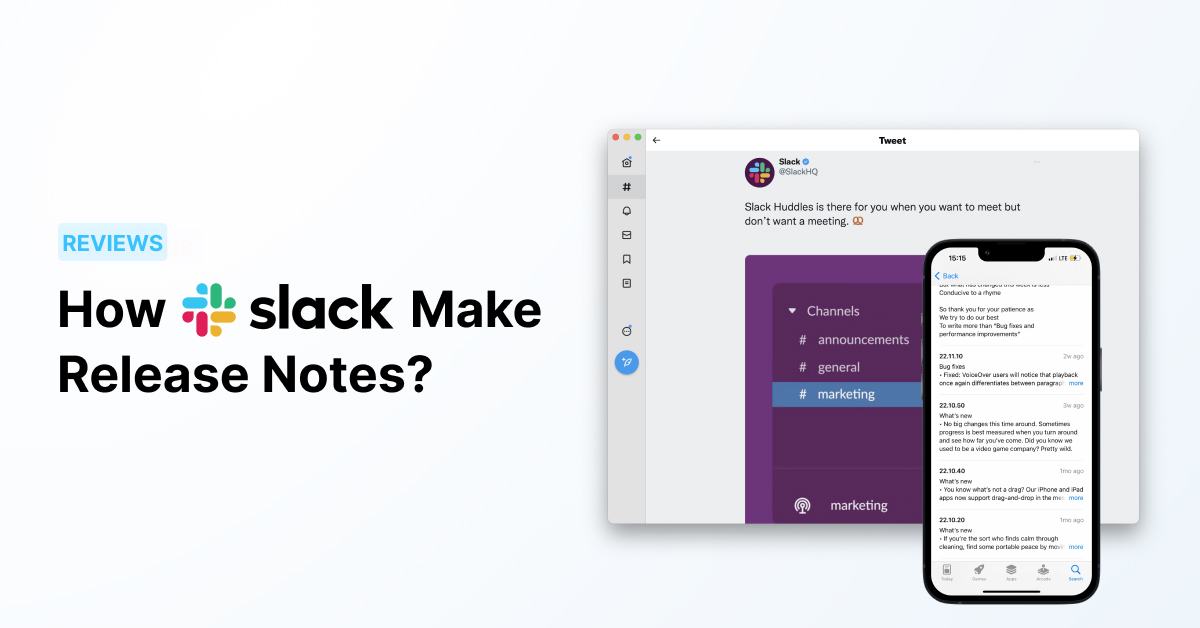
Forget all the boring release notes. Slack combines this business with creativity and art. Look at this poem from one of their iOS updates:
“Oh, sing a song for slower weeks / For those without fanfare / No features to elucidate / No bug fixes to share // We promise we’re still working, and / You’ll notice more in time / But what has changed this week is less / Conducive to a rhyme // So thank you for your patience as / We try to do our best / To write more than ‘Bug fixes and performance improvements'”
Slack has set the bar high for mobile app release notes. They’re not just long and boring — they’re also useful, informative, and fun to read. Here’s how Slack consistently does it:
- Write release notes in an unordinary way — surprise the reader
- Give a quick summary of what’s new since the last update
- Use a friendly tone and make it conversational, like you’re writing a letter to your users
- Be honest when you write release notes — even if you didn’t ship anything big this cycle
Sometimes you realize you haven’t done enough to announce in this release. So does that stop Slack from making an announcement? Of course not:
“No big changes this time around. Sometimes progress is best measured when you turn around and see how far you’ve come. Did you know we used to be a video game company? Pretty wild.”
5 More Real-World Release Notes Examples from Top SaaS Companies
Slack isn’t alone in writing great release notes. Here are five other SaaS companies that get it right — each with a different approach worth studying.
1. Notion
Notion’s release notes are clean, structured, and comprehensive. Each update is organized by product area (e.g., “AI,” “Databases,” “Mobile”) so that different types of users can quickly jump to what’s relevant to them. They consistently include screenshots and short GIF demos to show, not just tell, what changed. Notion’s approach works particularly well for power users who care about the details and want to understand exactly how a workflow has changed before updating their habits.
2. Linear
Linear treats their changelog as a product feature in itself. Each entry reads like a short technical essay: the team explains not just what changed, but why they made the decision and what tradeoff they considered. This level of transparency is rare and builds enormous trust among their developer-focused audience. Linear’s release notes signal that the team has thought deeply about the problem — and that matters to users who are evaluating whether to rely on the tool for critical work.
3. Intercom
Intercom publishes a regular “What’s New” digest that blends blog-style narrative with a structured list of updates. Each major feature gets a short paragraph explaining the business problem it solves — not just what the feature does, but why a customer should care. This is a masterclass in writing from the user’s perspective rather than from an engineering perspective. It works because Intercom’s customers are themselves in customer-facing roles and think in terms of outcomes, not features.
4. Figma
Figma’s release notes are notable for their visual quality. Every major release includes custom illustrations that capture the spirit of the update — sometimes playful, sometimes dramatic, always on-brand. But beyond the visuals, Figma’s team writes release notes that feel genuinely excited about the changes they’ve shipped. That authentic enthusiasm is contagious, and it turns what could be a dry changelog into a moment users look forward to.
5. HubSpot
HubSpot’s product update emails and in-app changelogs are among the most conversion-optimized in the industry. Each release note includes a clear call to action that drives the reader to try the new feature immediately. They also segment their release notes by user role (e.g., “Sales Hub,” “Marketing Hub”) so that users only see what’s relevant to their workflow. This segmentation dramatically increases engagement because users don’t have to wade through updates that don’t apply to them.
Release Notes Templates You Can Use Today
Great release notes start with a solid structure. Here are three copy-paste templates for the most common scenarios — feel free to adapt the tone to match your brand voice.
Template 1: Feature Launch
Version X.X — [Date]
🚀 New: [Feature Name]
You can now [do X]. This means [user benefit — what they can accomplish that they couldn’t before].
How to get started: Go to [Location] and [first action]. It takes less than [time] to set up.
We built this because [brief context — what problem this solves]. If you have feedback, [how to share it].
Template 2: Bug Fix
Version X.X — [Date]
🔧 Fixed: [Brief description of the issue]
Some users experienced [problem description]. This is now fixed. If you’re still seeing this, try [suggested action] or reach out to [support channel].
Thank you to everyone who reported this — your feedback directly shapes what we fix first.
Template 3: Minor Update / Maintenance
Version X.X — [Date]
A lighter update this time — but we’re not standing still. Under the hood, we’ve [brief technical description] which means [user-facing benefit, e.g., “things should feel snappier”]. We’re also working on [teaser of what’s coming next], which we’ll be sharing soon.
Thanks for using [Product Name]. We’re grateful you’re here.
How to Distribute Release Notes
Writing great release notes is only half the job — getting them in front of users is the other half. Here are the four main distribution channels and when to use each.
In-app notifications: This is the highest-engagement channel because users see the update at the exact moment they’re using your product. An in-app widget or changelog popup that appears when users log in drives significantly higher read rates than any other channel. Tools like AnnounceKit let you publish release notes directly into an in-app notification center without any engineering work. This is especially powerful for feature adoption — users who see a feature announcement inside the app are far more likely to try it immediately.
Email digest: A weekly or bi-weekly “What’s New” email works well for users who don’t log into the product every day. Keep it visual, scannable, and short — link to the full release notes for users who want details. Email works best for major releases, not every small bug fix.
Social media: Social is ideal for announcing small but interesting improvements that don’t warrant a full release note. Slack does this exceptionally well — they’ll tweet a one-liner about a workflow improvement that would seem trivial in a changelog but is delightful in a social context. This also helps reach users who may have churned or are evaluating whether to return.
Standalone changelog page: A public changelog page (e.g., yourproduct.com/changelog) serves as a permanent record of your product’s evolution. It’s referenced by power users, journalists, and prospects doing due diligence. A well-maintained changelog page can also rank in search results for queries like “[product name] updates” or “[product name] new features,” driving organic traffic from users actively looking for what you’ve shipped.
Who Is Responsible for Writing Release Notes?
In most SaaS companies, release notes fall into a gray area between product management, engineering, and marketing — which is exactly why they often end up as an afterthought. The honest answer is that the best release notes come from a collaboration: the product manager or engineer who built the feature provides the facts (what changed, what was fixed, what the edge cases are), while a writer — a product marketer, a technical writer, or even the PM with a strong writing voice — shapes those facts into something a user actually wants to read.
At Slack, the distinctive voice of their release notes is the work of their marketing and communications team working in close partnership with product. They have a style guide for release notes and a review process that ensures every update — from a major feature to a minor bug fix — sounds unmistakably like Slack. That consistency is not accidental; it’s a deliberate product and brand decision.
If you’re a small team and a dedicated writer isn’t realistic, the best approach is to designate one person as the “release notes owner” — someone who cares about writing quality and has enough product context to translate technical changes into user-facing language. Even one hour per week dedicated to this makes a measurable difference in the quality and engagement of your release notes.
How Often Should You Publish Release Notes?
The right cadence depends on your release cycle and your audience’s expectations. For mobile apps distributed through the App Store or Google Play, release notes accompany every update — and the App Store review process means those updates happen on a rolling basis. Most mobile-first companies end up publishing release notes every one to three weeks.
For web apps and SaaS products with continuous deployment, a weekly or bi-weekly digest tends to work better than releasing a note for every single change. Users don’t want to receive a notification every time you fix a typo. Instead, batch your smaller changes into a weekly update and reserve individual announcements for significant feature launches.
Whatever cadence you choose, the key is consistency. Users quickly learn to expect release notes from products that publish them regularly, and they notice — and often churn — when a product goes quiet. A consistent release note cadence signals that the product is actively maintained and that the team behind it is engaged.
Using Social Media for Product Updates
Software companies are constantly improving things and fixing bugs. If every change and fix had to be announced through a dedicated release note, a large team would have to be hired just for communications. That’s why important improvements are shared periodically through release notes, while smaller but interesting updates find a home on social media.
Slack does this brilliantly. One example tweet: “You may have wondered why you could set a topic in a channel but not a direct message. We wondered that too. Now you can set topics for DMs.” — This is a small UI change that would feel minor in a full changelog, but on social media it’s a delightful moment of product transparency that generates goodwill and engagement.
The Best Way to Distribute Your Release Notes: AnnounceKit
AnnounceKit is a tool that helps you create new feature announcements, share them within an in-app notification center, send announcement emails, and distribute them across social media channels — all from one place.
By using AnnounceKit, you can:
- Create in-app announcements for your product updates and increase product adoption rates. Thanks to widgets and boosters, your website visitors are informed about product updates, new features, and announcements — driving direct feature adoption.
- Reach your customers through all available communication channels. With Slack, email, and mobile notifications, you can ensure your customers are constantly in the loop, even if they don’t visit your website regularly.
- Write release notes faster with AI. With just a few keywords and some context, you can create great announcement texts in seconds.
To manage your product announcements in one place and distribute them quickly across multiple channels, try AnnounceKit today!
Frequently Asked Questions About Release Notes
What should release notes include?
Every release note should include a version number and date, a summary of the most important change, descriptions of new features and bug fixes, and any breaking changes that affect existing workflows. The best release notes also include a human-sounding closing line that reinforces your brand voice — a technique Slack has mastered. Avoid developer jargon and focus on what the change means for the user, not how it was implemented.
How does Slack write release notes?
Slack writes release notes with a distinctive personality — sometimes using poetry, humor, storytelling, or cultural callbacks to make even minor updates feel memorable. Their approach is rooted in a core principle: every release note is a conversation with the user, not a technical report for an engineering team. Slack’s release notes are written by their marketing and communications team in close collaboration with product, following an internal style guide that ensures tonal consistency across every update.
What is the difference between a changelog and release notes?
Changelog and release notes are often used interchangeably, but there is a subtle distinction. A changelog is typically a comprehensive, running log of all changes made to a product — often formatted as a public page (e.g., yourproduct.com/changelog) that documents every version. Release notes are usually more curated and audience-focused: they highlight the changes that matter most to users and are often distributed via the App Store, email, or in-app notifications at the moment of an update. Think of the changelog as the full record and release notes as the user-facing highlight reel.
How long should release notes be?
There is no universal rule, but a good guideline is: as long as necessary, as short as possible. For minor updates and bug fixes, two to four sentences is often enough. For major feature launches, a short paragraph per feature — plus a brief summary at the top — gives users the context they need without overwhelming them. The most common mistake is writing release notes that are too long and filled with developer-centric language that users don’t understand. Aim for clarity and scannability above all else.
How often should you publish release notes?
For mobile apps, release notes accompany every App Store update, which typically happens every one to three weeks. For web-based SaaS products with continuous deployment, a weekly or bi-weekly digest that batches smaller changes together works better than a release note for every individual fix. The most important thing is consistency — users learn to expect release notes from products that publish them regularly, and a sudden silence often signals (incorrectly or not) that the product has stalled.
Who is responsible for writing release notes?
In most companies, release notes are a shared responsibility between product management, engineering, and marketing. The engineer or product manager who built the feature supplies the facts; a writer shapes them into something worth reading. At early-stage startups, this often falls on the founder or a single PM. The key is to designate one person as the “release notes owner” — someone accountable for quality and consistency — rather than leaving release notes as a last-minute task that gets rushed before each App Store submission.
Conclusion
Software release notes play an important role in enabling your customers to become more aware of what changes, features, and fixes there are in your product. But most release notes are written in the same boring, impersonal way — and that’s a missed opportunity.
Slack’s release notes are creative and effective unlike other ordinary examples. While useful for customers and partners, release notes also help your team look at the big picture and understand the long-term progress of the product. Notion, Linear, Intercom, Figma, and HubSpot have each found their own way to make release notes worth reading — and each approach offers a lesson you can apply to your own.
After reading this post, you should have a clear picture of what to include in your next set of release notes, how to distribute them across channels, and how to maintain a cadence that keeps users engaged. Use Slack’s examples as a north star — and then find your own voice. The best release notes are the ones that sound like they came from your team, for your users, about a product you’re genuinely proud to be building.




![How CG Boost Keeps 3D Course Students Informed with AnnounceKit [Case Study]](https://announcekit.app/blog/wp-content/uploads/2021/08/Frame-2-2-768x402.png)