Updated July 2026 with changelog format standards, versioning guidance, automation workflows, and fresh examples.
To keep a changelog, record every notable change to your product in reverse-chronological order, grouped by release and categorized as Added, Changed, Deprecated, Removed, Fixed, or Security — the keepachangelog.com standard followed by thousands of software teams. Update it with every release, write entries for humans rather than machines, and publish it where users can actually find it.
Changelogs are more than just a boring API log of product announcements involving updates, bug fixes, and feature additions. It’s a development roadmap that guides users through the journey of your product’s evolution. The best, most engaging changelogs are created with one goal in mind: client engagement. If you want your product’s consumers to be excited about its enhancements and fixes, you have to make them excited. This can be achieved by keeping a changelog that is actionable, comprehensive, and fun while avoiding overcomplication and unnecessary clutter. Keep reading for information on keeping a changelog that stands out among competitors while maintaining customer trust and respect.
[toc]
Why Is Keeping a Changelog Important?
A changelog is a chronological record that documents all changes made to a project. It is specially curated to allow users to communicate with shareholders and customers and will enable them to follow the timeline of a project or product. Generally speaking, changelogs list notable changes, additions, or removals to products. The role of changelogs has evolved. The methods for keeping a changelog have been approached with software. Users are also much more interested in the evolution and fine-tuning of a product they’re using.
By keeping a public-facing changelog, your users can also track which feature requests have been fulfilled. Changelogs help generate excitement about new developments and assure clients that their voices are heard and their needs are met.
How Do You Decide if a Change Is Significant Enough To Include in a Changelog?
When a product or software changes, users want to know how and why. If a change will impact user experience in any way, it’s significant enough to include in your changelog.
This generally includes things like:
- Improvements
- Bug fixes
- Security updates
- New features
Be creative! Base your changelog on what your users find helpful or interesting. Using a changelog tool can improve your changelog’s accessibility for your audience.
[ak_cta]
How To Keep a Changelog With a Comprehensive Changelog Tool
One of the easiest ways to keep a changelog is to use tools like AnnounceKit to make the process as efficient and productive as possible.
If your marketing site runs on WordPress, start with our comparison of the best changelog tools that integrate with WordPress. And if you already keep a changelog elsewhere and want to switch tools, the changelog migration guide shows how to move your history without losing anything.
AnnounceKit’s changelog tool fosters transparent communication and enhances the overall user experience. Our changelog tool helps you keep a changelog by providing:
- Post scheduling
- In-app notification widgets
- Rich media content
- Push notifications
- User feedback and reactions
- User segmentation
- Customized design
- Privacy options
- Multiple languages
- User tracking
How To Write an Effective Changelog Post
Once you’ve picked a tool to help you keep a changelog, it’s time to start forming it. A changelog post generally contains the following components:
- Category: Create different categories for different contents.
- Date: Put the date of the announcement.
- Header: Write a header that includes the product name and the scope of the post.
- Overview: A brief description of what this post includes that emphasizes the change.
- Feedback: Your visitors should be able to leave a reaction or text-based response to your posts.
- Segmentation: This allows you to segment updates by demographics, location, language, URL, and past behavior on your site.
But writing a good changelog is more than just tacking on generic information. Since keeping a changelog has the potential to garner interest in the development of your product, a good changelog should be straightforward but also:
- Informative
- Organized
- Engaging
- Clear
- Hype-generating
- Aligned with your brand identity and personality
7 Best Practices for Keeping a Changelog
#1: Include a Call to Action
Always provoke an immediate response. Your call to action (CTA) is a crucial element on a changelog to motivate your sales funnel.
The tone and elements of your changelog can remind your consumers why they enjoyed your product in the first place. Examples of a good call to action featured in a changelog might be:
- Explore this new feature
- Learn more about this bug fix
- Try out new software integration
CTAs mentioned in changelogs should be:
- Worded in clear language
- Visually striking
- Placed strategically
- Action-oriented
#2: Set Up a Release Schedule
Create a weekly or monthly cadence and stick to the schedule. If you don’t have anything for a given week or month, try to understand why your progress goes slow and focus on where you may have gone wrong.
You may also want to schedule your releases around notable industry dates. For example, SaaS entertainment products like Soundcloud or Spotify might release changelogs around April or May to prepare for June and July, which experts say is the best time to release new music. Digital learning SaaS might also make announcements during the summer. It’s all about how you can strategically attract interest in your product.
[ak_cta]
#3: Remember That Changelogs Are for Humans
Changelogs are for people, not machines! Therefore, they need to be readable and understandable by someone with a basic understanding. There’s no point making things difficult for your customers. Complexity is impressive if you’re a software developer and not an average Joe trying to determine if that bug you experienced was patched. Difficulty may also discourage and dissuade people from wanting to be updated about your product in the future.
#4: Include Visual Components
A good image with a hook is like wrapping a gift; people always wonder what’s inside.
GIFs, images, screenshots, and even videos are perfect for making your changelog appealing. These features also make changelogs more engaging and sometimes make it easier to understand the change, especially for people unfamiliar with your product.
A great example of how to use striking visual components to make an excellent changelog would be Larian Studio’s changelog for Baldur’s Gate 3.
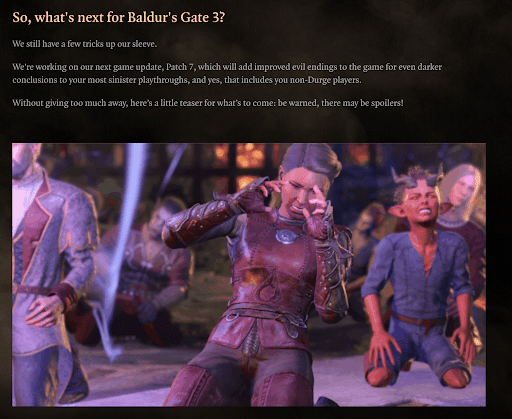
The turn-based video game won the 2024 Game of the Year Award. It continued to draw attention through its entertaining and appealing changelog until the studio declared the game 100% complete in April. As you can see, there is no shortage of video snippets, memes, and branded aesthetics in how Larian presents and writes its announcements.
#5: Make Your Changelog Accessible
Changelogs should be easily accessible from your navigation on your site and within your product. Usually, a technical changelog would be hidden away from normal users on your site. Your product’s changelog for users should be the opposite. It should be somewhere central and easy to access.
AnnounceKit makes it easy for your clients and consumers to access your changelog directly, make feature requests, and stay up-to-date on new product releases. By using AnnounceKit to create widgets for your website, your customers won’t have to go beyond the main page to get the full scoop.
#6: Provide Links to Relevant Sources
Have you ever read an article with a really interesting statistic, but the writer failed to provide a link to it? Then, you had to go down a rabbit hole yourself to find and verify it, and by the time you did, you weren’t too interested in reading the rest of the article?
This is how your users may feel if you don’t link relevant resources or information for your changes. Your changelogs should represent a comprehensive announcement that connects the dots for users to answer their questions and doesn’t leave them to hunt down answers on their own.
Providing key insight and information with relevant data in your changelogs may significantly impact product or feature adoption. By guiding users with links to relevant resources, you might be able to help them take the next step toward activating and using them!
You can use resources like blogs, tutorials, recorded webinars, etc., to help your users understand the impact of the changes you feature within your changelog.
#7: Keep Your Changelog Consistent and Easy To Read
Consistency fosters familiarity. Using a consistent format can enhance your changelog’s readability while establishing a distinct style that your audience can easily understand. The whole point is to provide a medium for updates that users can adapt to, creating a cohesive and user-friendly experience.
Consider keeping your changelog versioning the same. You should also zero in on making your changelog concise and readable using bullet lists. Unless you’re writing a literal novel, most of your readers won’t like reading through paragraphs and paragraphs. You can make your changelog easily skimmable by breaking up your main points and key changes into bullet lists.
4 Examples of Businesses Who Followed Changelog Best Practices
Let’s review three examples of good changelogs. These examples accumulate public interest and enhance their products and brands by elevating user experience.
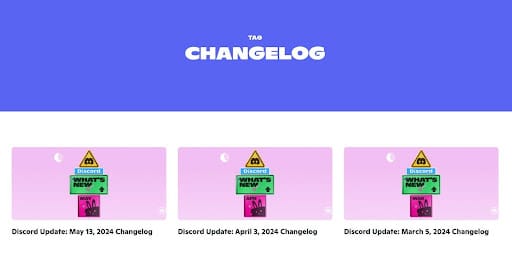
Example #1: Discord
Discord is a communication app generally used in the gaming industry. It allows users to connect over their interests through voice calls, video calls, and online messaging. The company has a large audience with a value of $15 billion with over 200 million active users a month. One of the most impressive things about how Discord keeps its changelog is the casual and relaxed tone unique to the platform’s brand. Their changelogs are almost like playful prose littered with pop culture references and memes. Discord’s changelog keeps its users updated and eagerly awaiting new announcements. It has also formed a way of maintaining a changelog central to its brand identity.
Example #2: Slack
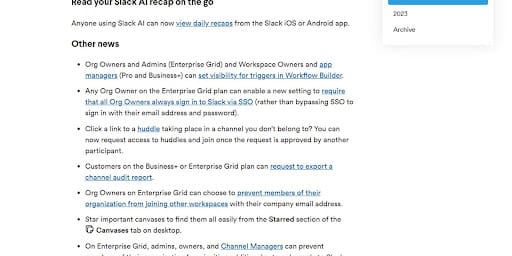
Have you ever wondered what a changelog would look like if that cool coworker announced software updates over a simple email? Slack presents its changelogs just as if it were that.
Slack’s changelog embodies its purpose as a SaaS company in the way it keeps a changelog. Since it is a $26.51 billion corporation used to connect work groups and coordinate project communication, it only makes sense that their changelog exudes an informational but conversational tone. Their changelog mirrors the way information is presented in Slack channels and threads. All updates are straightforward and distilled into easy-to-read snippets so users won’t miss a beat when a new integration or feature rolls out.
Example #3: Minecraft
As one of the most popular, best-selling video games of all time, Minecraft has remained a staple for gamers, young and old. Its changelog is a vital part of its long-term success.
A good changelog generates hype and holds consumer interest. If people enjoy a product, they’ll wait with bated breath for announcements and new rollouts, creating a cycle of hype. Minecraft knows how to keep a changelog that does just that. From brand-produced YouTube videos to visually creative feature announcements, Minecraft’s changelogs are an indispensable tool for disseminating the game. They keep many fans in love with the game as if it weren’t released 14 years ago.

#4: Canva
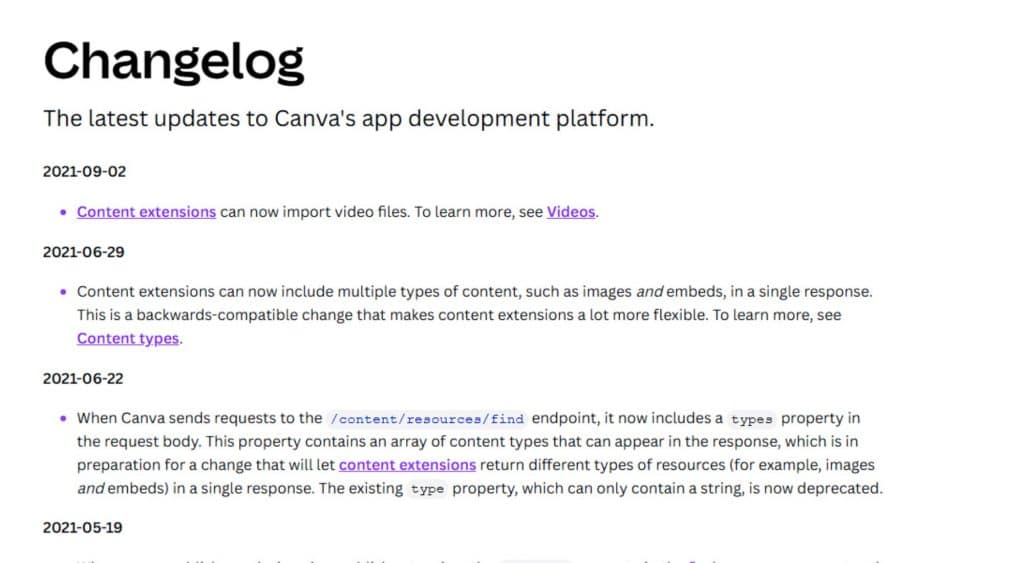
From having a well-organized and detailed changelog to including links that direct users to tutorials and more information, Canva’s comprehensive changelog is an excellent example of the golden rule of changelogs: keep it simple and make it clear. If a user wants to know how to use one of Canva’s new features or included extensions mentioned in their changelog, they don’t have to figure it out for themselves or find a YouTube video explaining it. They can click on one of the resources featured and quickly learn how it all works. Canva also uses these links to explain the backend data that might interest other developers but not the average user who probably uses the application for work or creative purposes.
What NOT To Do When Keeping a Changelog
#1: Don’t Include Every Little Detail
Don’t include everything you do. Writing about detailed technical issues is only interesting if it results in performance gains or improves the user experience. Of course, your changelog should touch on technical details but primarily focus on how changes benefit users.
#2: Don’t Hide From Your Customers
Encourage customers to interact with your changelog and team. The more interactive your changelog is, the more users will engage.
The old definition of a changelog doesn’t fit anymore! Your changelog is no longer just for technical notes but should be a central, dynamic part of your user communication system. It can be a powerful tool for your team to engage with users and get important direct feedback.
#3: Don’t Forget To Update Deprecations
Certain functionalities or features may become obsolete or replaced as your project progresses. To foster trust and a positive user experience, ensure your changelog clearly communicates any deprecations or removals.
Address reported user concerns by telling them exactly why the feature was removed and keeping them updated on new features that improve the user experience more.
#4: Don’t Separate Related Challenges
Group related changes together. This makes your changelog more readable and organized. The point is for it to flow, not jump back and forth from a related subject to an unrelated topic. Whether bug fixes, new features, or improvements, presenting related changes helps users quickly view each update without getting lost in a sea of information.
#5: Don’t Make Your Changelog Difficult To Access
Don’t design your changelog only as a separate page that users must access to see if you have a new update. Always include a sidebar or widget on your landing page that leads them to a separate page. AnnounceKit allows you to do both. In this way, you may attract more users to your stand-alone page.
What Is a Changelog?
A changelog is a structured, chronological record of all notable changes made to a project, product, or codebase. It is written for humans — developers, product managers, and end users alike — to understand what changed, why it changed, and how those changes affect them. A well-written changelog answers the question every user has when they open an app and notice something different: what happened?
Unlike internal commit logs or technical release notes, a public-facing changelog is curated communication. It filters out noise and surfaces only the changes that matter to the reader. The best changelogs follow a consistent format, use clear language, and are organized by date or version so readers can navigate them effortlessly. Understanding what a changelog is and why it matters is the first step toward keeping one that actually serves your users.
Changelogs are closely related to — but distinct from — release notes. Release notes tend to be more formal and tied to a specific product version, while changelogs are living documents that grow continuously. Both serve transparency, but a changelog is the more user-friendly, always-accessible record that your customers can consult at any time.
Changelog Format: What a Good Changelog Looks Like
The most widely adopted changelog standard comes from keepachangelog.com, which defines a practical format that thousands of open-source projects and SaaS products follow. Understanding this format helps you keep a changelog that is both machine-readable and genuinely useful to humans. If you want a ready-made starting point, our changelog template and examples follow this same structure.
A well-structured changelog organizes changes into six standardized categories for each release entry:
- Added — New features or capabilities introduced in this release.
- Changed — Modifications to existing functionality, including behavior changes and updates.
- Deprecated — Features that still work but are being phased out and will be removed in a future release.
- Removed — Features or functionality that have been permanently removed.
- Fixed — Bug fixes and corrections to broken behavior.
- Security — Patches addressing vulnerabilities or security risks.
Not every release will include entries in all six categories — and that is fine. Only use the categories that apply. The key is consistency: using the same structure every time makes it easy for users to quickly scan and find what matters to them.
Here is what a typical CHANGELOG.md entry looks like in practice:
## [2.4.0] - 2026-03-15

### Added
- New in-app notification widget with custom positioning options
- Support for webhook triggers on changelog publish events

### Changed
- Improved loading speed of the widget by 40% on mobile devices

### Fixed
- Fixed a bug where scheduled posts would not publish on the correct timezone

### Security
- Updated dependencies to address a known XSS vulnerability in the rendering engine
Even if your changelog lives on a web page rather than a Markdown file, following this categorical structure gives readers a predictable, scannable experience. Tools like AnnounceKit allow you to apply these categories visually — using labels and tags — so your users get the clarity of the standard format without requiring any technical knowledge to navigate it.
How Versioning Connects to Your Changelog
Versioning is the system you use to number each release of your product, and it is deeply intertwined with how you keep a changelog. Without a clear versioning strategy, your changelog entries have no anchor — readers cannot tell whether a change is a minor tweak or a breaking update. Deciding how to version your product before you start keeping a changelog will save you significant confusion later.
The most widely used versioning convention is Semantic Versioning (SemVer), which uses a three-part number: MAJOR.MINOR.PATCH. A MAJOR version increment signals a breaking change — something that may require users to update their workflow or code. A MINOR increment introduces new features in a backward-compatible way. A PATCH increment covers bug fixes and small improvements that do not change the product’s interface or behavior. For example, moving from version 2.3.1 to 2.4.0 tells your users that new features were added without breaking anything they already relied on. For a deeper dive into numbering strategies, see our guide to changelog versioning.
Other versioning approaches include date-based versioning (e.g., 2026.03.15), which is common for products that release on a regular calendar schedule, and codename versioning, used by products like Android or Ubuntu that attach memorable names to major releases for marketing purposes. Whichever system you choose, apply it consistently in every changelog entry. When users see a version number in your changelog, it should immediately tell them the scope and nature of what changed — before they read a single line of the entry itself.
How To Automate Changelog Generation
Manually updating a changelog for every release is sustainable when your team is small and releases are infrequent. As your product scales, however, the manual process becomes a bottleneck — releases pile up, entries get skipped, and the changelog drifts out of sync with reality. Automation removes this friction and ensures your changelog stays accurate without requiring constant manual intervention. (We cover the customer-facing side of this in how to automate release notes.)
For developer-facing changelogs, tools like semantic-release, standard-version, and Conventional Commits can automatically parse your Git commit history and generate a structured CHANGELOG.md with each release. These tools work best when your team adopts a consistent commit message format — for example, prefixing commits with feat:, fix:, or chore: — so the automation can correctly categorize changes into the six standard groups. CI/CD pipelines (GitHub Actions, GitLab CI, CircleCI) can trigger these scripts automatically on each merge to your main branch.
For user-facing, marketing-friendly changelogs, tools like AnnounceKit integrate with your development workflow via API, Zapier, and webhook triggers. You can set up a workflow where merging a release branch automatically drafts a changelog post in AnnounceKit, ready for a product manager to review and publish with one click. This hybrid approach — automated drafting, human-curated publishing — gives you the speed of automation while preserving the editorial quality that makes a changelog genuinely useful to end users.
Frequently Asked Questions About Keeping a Changelog
How do you decide if a change is significant enough to include in the changelog?
If a change affects the user experience in any way — positively or negatively — it belongs in the changelog. This includes new features, bug fixes, performance improvements, security patches, and deprecations. Changes that are purely internal (refactoring code without changing behavior, updating internal tooling) generally do not need to be included in a user-facing changelog, though they may belong in an internal or developer changelog.
How do I implement effective change logs?
Start with a consistent structure using the six standard categories (Added, Changed, Deprecated, Removed, Fixed, Security), tie each entry to a version number, and write for your audience rather than for yourself. Use plain language rather than technical jargon for user-facing changelogs. Publish on a regular cadence so users know when to expect updates, and make the changelog easy to find — either via a dedicated page, an in-app widget, or both.
What is the standard format for a changelog file?
The most widely adopted standard is the format defined at keepachangelog.com, which uses a Markdown file named CHANGELOG.md organized by version number in descending order (newest first). Each version block uses the six standard change categories as subheadings. The format is human-readable, easy to diff in version control, and straightforward to automate with tools like semantic-release or standard-version.
What should you not include in a changelog?
Avoid including every internal code change, raw commit message dumps, or overly technical details that mean nothing to your users. Do not include changes that have no user-visible impact. Also avoid vague entries like “various bug fixes” — be specific about what was fixed and why it matters. A changelog that is too granular or too vague is equally unhelpful to its readers.
How often should you update a changelog?
You should update your changelog every time you release a new version of your product. For products on a continuous delivery model, this may mean weekly or even daily updates. For products on a traditional release cycle, it may mean monthly or quarterly. The key is to tie changelog updates to your release cadence — every release, no exceptions — rather than treating it as an afterthought.
Should you automate changelog generation?
Yes, for developer-facing changelogs, automation using tools like semantic-release and Conventional Commits is strongly recommended at scale. For user-facing changelogs, a hybrid approach — automated drafting combined with human editorial review — tends to produce the best results. Full automation of user-facing changelogs risks publishing entries that are technically accurate but poorly written or tone-deaf to the audience.
What is the difference between a changelog and release notes?
A changelog is a running, cumulative record of all changes to a product, typically maintained in a single document that grows over time. Release notes are usually a standalone document tied to a specific version or release event, often more formal and comprehensive. In practice, the terms are often used interchangeably, but a changelog tends to be more user-accessible and continuously updated, while release notes are more version-specific and may be archived once the release is superseded.
How do you write a good changelog entry?
A good changelog entry starts with the correct category (Added, Changed, Fixed, etc.), uses active voice and plain language, explains what changed and why it matters to the user, and links to relevant documentation or tutorials where appropriate. Keep each entry to one or two sentences. If a change requires extensive explanation, link to a dedicated blog post or help article rather than embedding a wall of text in the changelog itself.
AnnounceKit: Changelog Software for Seamless Product Updates
Changelogs may traditionally be technical, but why over complicate the process when you can simplify and streamline it? AnnounceKit makes it easy for anyone to keep a changelog.
Changelogs are a fantastic marketing tool. You shouldn’t skip out on them because they take time to create and manage. After all, they don’t with the help of AnnounceKit. Keeping a changelog with no-code tools, like our changelog tool, makes the process sweat-free and easy. Learn more about our changelog tool or request a free demo today.
[ak_cta]

![How Agendrix Saves Time on Product Update Communication Using AnnounceKit [Case Study]](https://announcekit.app/blog/wp-content/uploads/2022/01/Frame-24-768x402.png)